


TABLE OF CONTENTS
1. Introduction: The Hidden Complexity of IoT Onboarding at Scale
As IoT deployments evolve from laboratory prototypes to production fleets of thousands of edge devices, secure device onboarding emerges as one of the most challenging operational bottlenecks. Each Edge Controller must cryptographically prove its identity to AWS IoT Core, receive appropriate configuration, and assume AWS permissions, all without manual intervention.
In small pilots, manually creating certificates, configuring IAM credentials, and registering devices one-by-one remains manageable. But as deployments scale to hundreds or thousands of units, this approach collapses under operational strain, security risks, and configuration inconsistencies.
The challenge: How do you enable thousands of devices to securely self-register with AWS IoT Core and Greengrass without pre-loading sensitive IAM keys, manual provisioning steps, or security vulnerabilities?
This article explores how AWS IoT Fleet Provisioning (Provisioning by Claim) solves this problem by automating trust establishment and certificate issuance through a cloud-orchestrated, device-initiated workflow.
2. Understanding Core Components
Before examining provisioning workflows, understand that each Edge Controller requires six core AWS resources:
- an X.509 certificate for authentication and MQTT encryption
- a certificate policy defining permissions
- an IoT Thing registry entry & IoT Thing Group
- a Token Exchange Role & Token Exchange Role Alias for accessing AWS services via API or SDK
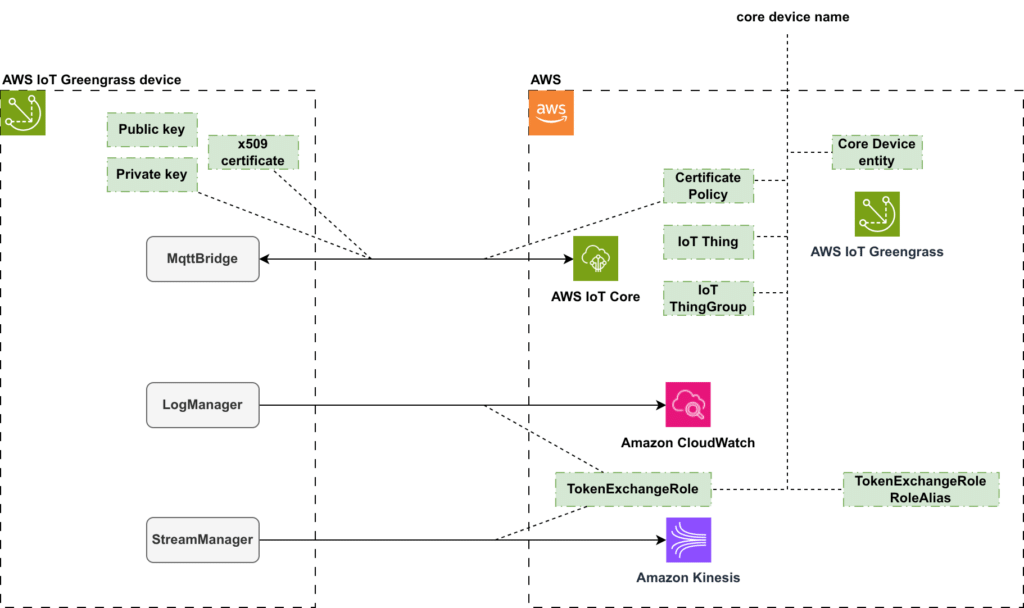
These components establish the trust boundary, defining who the device is, what it can do, and how it connects.
3. The Original Provisioning Flow, Manual, and Fragile
The initial architecture requires manual intervention at every step:
- Generate RSA key pair and Certificate Signing Request (CSR)
- Request certificate creation from the CSR message
- Create new IoT policy and attach it to the certificate
- Manually create IoT Thing and attach certificate to it in AWS IoT Core via Console or CLI
- Create IAM Token Exchange role, its policy and IoT Role Alias
- The certificate should be deployed to the device, and an AWS IoT Greengrass configuration file, consolidating all these properties, must be created.
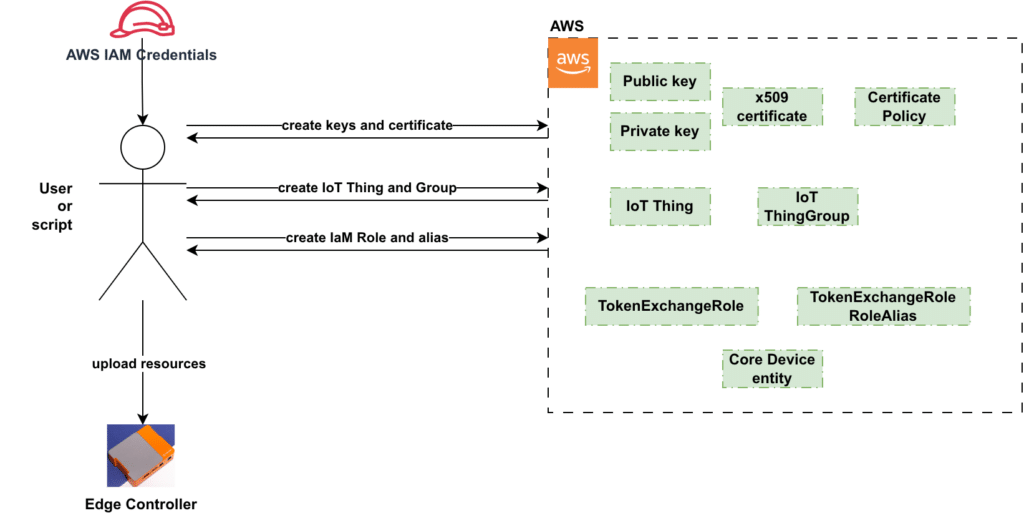
This workflow reveals critical weaknesses:
| Challenge | Impact |
| Manual Scaling Failure | Each device requires human intervention; impossible at scale |
| IAM Credential Exposure | Scaling this approach is unfeasible, as implementing this logic on the device is prohibited due to the excessively broad permissions of the AWS IAM credential required for accessing AWS resources and creating new ones. |
| Configuration Drift | Manual steps lead to inconsistencies: incorrect Thing-certificate associations, mismatched endpoint configurations, human errors in resource naming |
| Rotation Complexity | Updating certificates requires coordinated manual operations |
These constraints demanded a solution: automate device registration from the cloud, with devices initiating their own provisioning.
4. AWS IoT Fleet Provisioning, Provisioning by Claim
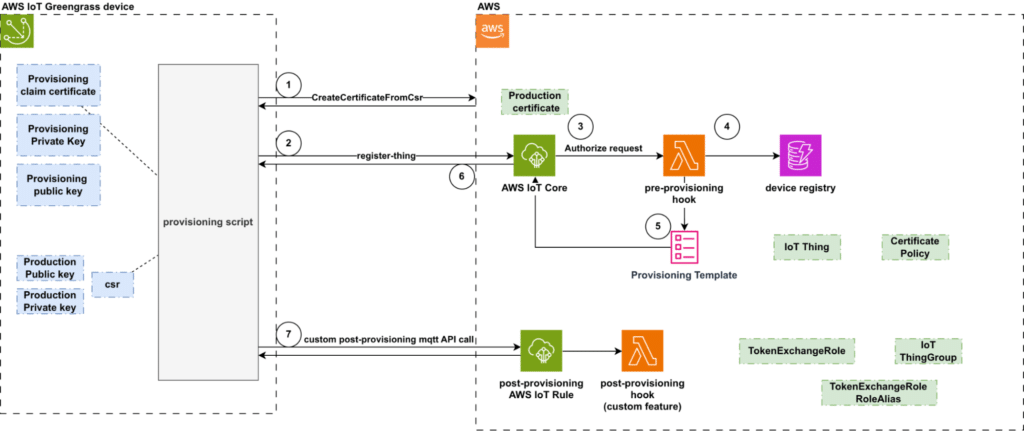
Fleet Provisioning transforms onboarding from an operator-driven push to a device-initiated, cloud-authorized pull model. Devices register themselves using temporary “claim” certificates with minimal, tightly scoped permissions.
Understanding Claim Certificates
In standard Fleet Provisioning by Claim, a single claim certificate is shared across all devices during manufacturing. This certificate has extremely limited permissions, it can only connect to AWS IoT Core and call the device provisioning MQTT API. Because the claim certificate cannot publish data, subscribe to device topics, or access other AWS resources, sharing it across the fleet poses minimal security risk.
The Core Workflow
Step 1: Device Connects with Claim Certificate
The device connects to AWS IoT Core using the shared claim certificate. It generates a key pair locally, creates a Certificate Signing Request (CSR), and calls CreateCertificateFromCsr. AWS IoT Core returns:
- A production X.509 certificate (inactive at this stage)
- A private key (if requested, or just the certificate if device generated the key pair)
- A temporary certificateOwnershipToken (required for the next step)
Step 2: Device Calls RegisterThing
The device publishes a registration request to $aws/provisioning-templates/<template-name>/provision/json:
{
  "certificateOwnershipToken": "<token-from-step-1>",
  "parameters": {
    "SerialNumber": "EDGECTRL-00123"
  }
}
Step 3: Claim Certificate Validation
AWS IoT Core verifies that the connection is using a valid claim certificate with permissions to call the provisioning template.
Step 4: Pre-Provisioning Hook (Optional)
AWS IoT Core optionally invokes a pre-provisioning Lambda hook for custom authorization logic, such as validating serial numbers against a manufacturing database or verifying TPM attestation data.
Step 5: Provisioning Template Execution
If authorized, AWS executes the provisioning template to:
- Activate the production certificate (created in Step 1)
- Create an IoT Thing with the specified name
- Attach the production certificate to the Thing
- Attach IoT policies to the certificate
Step 6: Device Receives Confirmation
AWS returns a confirmation message via MQTT containing the Thing name and other resource details. The device now has an active production certificate and can disconnect from the claim certificate.
Step 7: Device Reconnects with Production Certificate
The device reconnects to AWS IoT Core using its production certificate for all future operations. The shared claim certificate remains active for provisioning additional devices.
Outcome: The device transforms from unregistered to fully authenticated, automatically, securely, without operator intervention.
Note: This describes the standard Fleet Provisioning by Claim approach where a single claim certificate is shared across all devices. AWS also supports Trusted User provisioning, where each device receives a unique temporary certificate that is revoked after successful provisioning. The shared claim certificate model is more common for manufacturing scenarios as it simplifies device pre-configuration.
5. Key Terms and Components
Understanding these concepts is essential:
- Provisioning Claim Certificate: Temporary X.509 certificate with permissions limited to device registration
- Provisioning Template: JSON document defining AWS resources to create per device (Thing, certificate, policies)
- Pre-Provisioning Hook: Optional Lambda function authorizing or denying registration requests
- Production Certificate: Permanent certificate issued after successful provisioning
6. Implementation, Step-by-Step
Step 1: Create Provisioning Template
The provisioning template consists of two sections:
- Parameters: input provided by the device when invoking the Device Provisioning MQTT API.
- Resources: description of the AWS resources to be created.
Resources can be
- IoT Thing: Defines the attributes of the AWS IoT Thing to be created.
- IoT Certificate: Specifies the the certificate to activate (note: Fleet Provisioning templates only accept certificate IDs, not CSRs).
- IoT Policy: The certificate policy to be associated with the certificate. This establishes the permission boundaries for the certificate.
{
  "Parameters": {
    "SerialNumber": { "Type": "String" },
    "CSR": { "Type": "String" },
  },
  "Resources": {
    "thing": {
      "Type": "AWS::IoT::Thing",
      "Properties": {
        "ThingName": { "Fn::Join": ["", ["EdgeController-", {"Ref": "SerialNumber"}]] }
      }
    },
    "certificate": {
      "Type": "AWS::IoT::Certificate",
      "Properties": {
         "CertificateId": {"Ref": "AWS::IoT::Certificate::Id"},
         "Status": "ACTIVE"
      }
    },
    "policy": {
      "Type": "AWS::IoT::Policy",
      "Properties": { "PolicyName": "EdgeControllerPolicy" }
    }
  }
}
Note: In Fleet Provisioning templates, AWS::IoT::Certificate::Id is a special reference that points to the certificate created via CreateCertificateFromCsr and linked through the certificateOwnershipToken. CSR-based certificate creation within the template itself (CertificateSigningRequest) is only supported in Just-In-Time Provisioning (JITP) templates.
The Provisioning Template can be established utilizing the CreateProvisioningTemplate API or as an integral component of a CloudFormation stack or even create the template via AWS Management Console in IoT Core. Each template is uniquely identified by a name, which devices will employ when invoking the Device Provisioning MQTT API.
Step 2: Create Claim Certificate with Minimal Policy
Create a shared claim certificate with limited permissions for provisioning operations only:
aws iot create-keys-and-certificate --set-as-active \
  --certificate-pem-outfile claimCert.pem \
  --private-key-outfile claimKey.pem
Attach a policy allowing only provisioning operations:
{
  "Version": "2012-10-17",
  "Statement": [
    {
      "Effect": "Allow",
      "Action": ["iot:Connect"],
      "Resource": "arn:aws:iot:*:*:client/*"
    },
    {
      "Effect": "Allow",
      "Action": ["iot:Publish", "iot:Receive"],
      "Resource": [ "arn:aws:iot:*:*:topic/$aws/certificates/create-from-csr/*", "arn:aws:iot:*:*:topic/$aws/provisioning-templates/<your_template_name>/provision/*"
      ]
     },
     { "Effect": "Allow",
        "Action": ["iot:Subscribe"],
"Resource": [ "arn:aws:iot:*:*:topicfilter/$aws/certificates/create-from-csr/*", "arn:aws:iot:*:*:topicfilter/$aws/provisioning-templates/<your_template_name>/provision/*"
    ]
   }
  ]
}
This policy permits:
- Connecting to AWS IoT Core
- Creating production certificates via CreateCertificateFromCsr
- Calling the RegisterThing API on provisioning templates
Step 3: Device requests production certificate creation from CSR
Sample of python script that executes certificate creation requests using MQTT connection from claim certificate. The script uses AWS IoT SDK IdentityClient
from awsiot import iotidentity, mqtt5_client_builder
from awscrt import mqtt5, mqtt_request_response
from concurrent.futures import Future
import uuid


if __name__ == '__main__':
   iot_endpoint = "<aws iot connection endpoint>"
   crs_file = "<path_to_csr_file>"
   claim_cert_pem = "<provisioning claim certificate pem>"
   claim_private_key = "<path location of private key>"
   provisioning_template_name = "<your template name>"

   with open(csr_file, "r") as csr_file:
       csr_data = csr_file.read()


   # ---------------------------------
   # Utility callback methods and parameters
   initial_connection_success = Future()
   def on_lifecycle_connection_success(event: mqtt5.LifecycleConnectSuccessData):
       initial_connection_success.set_result(True)
 def on_lifecycle_connection_failure(event: mqtt5.LifecycleConnectFailureData):
       initial_connection_success.set_exception(Exception("Failed to connect"))


   def on_lifecycle_disconnection(event: mqtt5.LifecycleDisconnectData):
       print("Lifecycle Disconnected with reason code:{}".format(
           event.disconnect_packet.reason_code if event.disconnect_packet else "None"))


   stopped = Future()
   def on_lifecycle_stopped(event: mqtt5.LifecycleStoppedData):
       stopped.set_result(True)


   connect_options=mqtt5.ConnectPacket(
       client_id="mqtt5-sample-" + uuid.uuid4().hex,
   )
   # ---------------------------------


   # Create a mqtt5 connection
   mqtt5_client = mqtt5_client_builder.mtls_from_path(
       endpoint=iot_endpoint,
       port=8883,
       connect_options=connect_options,
       cert_filepath=claim_cert_pem,
       pri_key_filepath=claim_private_key,
       clean_session=True,
       keep_alive_secs=1200,
       on_lifecycle_connection_success=on_lifecycle_connection_success,
       on_lifecycle_connection_failure=on_lifecycle_connection_failure,
       on_lifecycle_disconnection=on_lifecycle_disconnection,
       on_lifecycle_stopped=on_lifecycle_stopped)


   mqtt5_client.start()


   rr_options = mqtt_request_response.ClientOptions(
       max_request_response_subscriptions = 2,
       max_streaming_subscriptions = 0,
       operation_timeout_in_seconds = 30,
   )

   # Initializing IdentityClient for invoking AWS registration APIs
   identity_client = iotidentity.IotIdentityClientV2(mqtt5_client, rr_options)


   initial_connection_success.result()
   print("Connected!\n")


   # creating certificate from CSR file
   create_certificate_from_csr_response = identity_client.create_certificate_from_csr(iotidentity.CreateCertificateFromCsrRequest(
       certificate_signing_request=csr_data
   )).result()
   print(f"CreateCertificateFromCsr response: {create_certificate_from_csr_response}\n")


  # ... STEP 4 invoke Registration API
Step 4: Device Invokes Registration
The device publishes a registration request to:
$aws/provisioning-templates/<template-name>/provision/json
payload
{
  "certificateOwnershipToken": "xyz789...",
  "parameters": {
    "SerialNumber": "EDGECTRL-00123"
  }
 # ... Step 3: create certificate from CSR


   # creating RegisterThing API specifying certificateOwnershipToken
   register_thing_request = iotidentity.RegisterThingRequest(
       template_name=provisioning_template_name,
       certificate_ownership_token=create_certificate_from_csr_response.certificate_ownership_token,
   )
register_thing_request.parameters = {
       "SerialNumber": "EDGECTRL-00123" # parameters you want to specify for the provisioning template
   }


   register_thing_response = identity_client.register_thing(register_thing_request).result()
   print(f"RegisterThing response: {register_thing_response}\n")


   mqtt5_client.stop()
   stopped.result()
   print("Stopped!")
AWS IoT Core:
- Validates the claim certificate
- Verifies the certificateOwnershipToken and identifies the associated production certificate
- Triggers the optional pre-provisioning Lambda hook
- Executes the provisioning template to create resources and activate the certificate
- Returns confirmation via MQTT
The device receives the Thing name and resource details, disconnects from the claim certificate, and reconnects using the production certificate for all future operations.
7. Custom Authorization with Pre-Provisioning Hooks
Pre-provisioning Lambda hooks enable fine-grained control before device registration. The Lambda function is invoked by AWS prior to the creation of resources using the Provisioning Template.
Use Case 1: Serial Number Validation
import boto3
import botocore.exceptions
import logging


dynamodb_client = boto3.client("dynamodb")


logger = logging.getLogger()
logger.setLevel(logging.DEBUG)
# Create a console handler with the custom formatter
console_handler = logging.StreamHandler()
console_handler.setFormatter(logging.Formatter(
   fmt="%(asctime)s %(levelname)s [%(module)s.%(funcName)s:%(lineno)d] %(message)s",
))
logger.addHandler(console_handler)


def is_provisioning_allowed(serialNumber: str) -> bool:
   try:
       device_registry_response = dynamodb_client.query(
           TableName="device_registry_table",
           KeyConditionExpression="device_id = :device_id_val",
           ExpressionAttributeValues={":device_id_val": {"S": serialNumber}},
           ExpressionAttributeNames={'#status': 'status'},
           Select="SPECIFIC_ATTRIBUTES",
           ProjectionExpression="device_id,customer_id,#status,version"
       )

       if device_registry_response.get("Count", 0) == 0:
           logger.error("No device pending activation found for the requested serialNumber: %s", serialNumber)
           return False


       device_status = device_registry_response.get("Items")[0].get("status", {}).get("S", "")

       if "PENDING_PROVISIONING" != device_status:
           logger.error("Device status %s is not allowed for provisioning", device_status)
           return False

       return True

   except botocore.exceptions.ClientError as e:
       logger.error("Unexpected error occured when requesting status of device", exc_info=e)
       return False


def lambda_handler(event, context):
   serial = event['parameters']['SerialNumber']

   # Validate against manufacturing database
   if is_provisioning_allowed(serial):
       return {"allowProvisioning": True}
   else:
       return {"allowProvisioning": False}
The Pre-Provisioning lambda function is responsible for parsing event input received from the device and subsequently verifying its Serial Number against the device-registry DynamoDB table. Provisioning is permitted only if the corresponding DynamoDB entry indicates a device status of PENDING_PROVISIONING.
The Pre-Provisioning lambda must return json object of pre-defined format
# if request validation failed and provisioning is not allowed
{
    "allowProvisioning": "false"
}


# if verification succeeded and provisioning is allowed
{
    "allowProvisioning": True,
 "parameterOverrides": {
        "<key>": "<value>",
    }
}
A successful response may optionally include the parameterOverrides field for the enrichment of the Provisioning Template Parameters section.
8. Post-provisioning
While the AWS Provisioning Template offers capabilities for the creation of essential IoT resources, specifically the IoT Thing, Certificate, and Policy, AWS Greengrass necessitates the establishment of more customized resources, such as an IAM TokenExchange role and an associated IoT Role Alias for that IAM TokenExchange role.
The AWS Fleet Provisioning API does not offer a solution for this scenario, necessitating a custom implementation. For instance, a custom MQTT API endpoint could be established to manage post-provisioning actions. An IoT Rule can then be utilized to route the MQTT API request to some custom Post-Provisioning AWS Lambda function.
9. Integration with AWS IoT Greengrass
Upon successful invocation of the Device Provisioning MQTT API and the Post-Provisioning hook, the device is supplied with all necessary information (such as the certificate and thing name) to establish a fully functional production MQTT connection.
That information can be used to prepare AWS Greengrass configuration file:
system:
  certificateFilePath: "/greengrass/v2/certs/production-cert.pem"
  privateKeyPath: "/greengrass/v2/certs/production-private.key"
  thingName: "EdgeController-EDGECTRL-00123"

services:
  aws.greengrass.Nucleus:
    configuration:
      awsRegion: "us-east-1"
      iotDataEndpoint: "a1b2c3d4e5-ats.iot.us-east-1.amazonaws.com"
For enhanced security with TPM-backed keys:
system:
  privateKeyPath: "pkcs11:object=edge-key;type=private;pin-value=1234"
10. Security Benefits
| Benefit | Impact |
| Zero Static Credentials | IAM keys completely eliminated from devices |
| Minimal Attack Surface | Claim certificates restricted to single operation |
| Cloud-Enforced Authorization | Security policies centralized and auditable |
| Complete Audit Trail | Every registration logged to CloudTrail |
| Automated Rotation | Certificate renewal via re-provisioning |
11. Troubleshooting Common Issues
| Symptom | Cause | Resolution |
| Provisioning fails | Invalid / revoked claim certificate | Verify with aws iot describe-certificate |
| Device not registered | Lambda rejected request | Check CloudWatch Logs |
| Connection refused | Wrong endpoint/region | Confirm iotDataEndpoint matches region |
| Duplicate Thing names | Non-unique parameters | Use UUIDs in template |
12. Conclusion: Provisioning as a Security Foundation
Problem Statement:
Traditional provisioning required manual certificate creation, static IAM credential distribution, and per-device configuration. This failed to scale, created security vulnerabilities, and imposed unsustainable operational overhead. Manual processes introduced configuration drift and compliance gaps.
Solution Implemented:
AWS IoT Fleet Provisioning with Provisioning by Claim transforms onboarding into a cloud-orchestrated, device-initiated workflow. Devices present temporary claim certificates, AWS validates through Lambda hooks, and production credentials are dynamically issued. Static credentials are eliminated entirely.
Outcomes Achieved:
- Scalability: Thousands of devices self-register simultaneously
- Security: Zero static credentials; minimal claim certificate scope
- Automation: Provisioning occurs on first boot without manual steps
- Auditability: Complete history in CloudTrail and CloudWatch
- Flexibility: Lambda hooks enable TPM attestation and custom logic
Combined with TPM-based hardware security, Fleet Provisioning creates a complete chain of trust from silicon to cloud: device identity generated in hardware → proven via claim certificate → validated by cloud → production credentials issued to verified devices.
This architecture scales from pilot to global fleets while satisfying regulatory requirements (FIPS 140-3, ISO 27001, IEC 62443).
Additional Resources
AWS Documentation:
Related Articles:
By Maxim Maltsev, Edge Computing Solution Architect, Klika Tech and Mohammad Shirazi, Portfolio Manager, Klika Tech