


TABLE OF CONTENTS
See the previous part “Security in AWS – Part 3”.
Domain 4: Identity and Access Management
Identity and Access Management (IAM) sits at the center of AWS security. It determines who can access which resources, under what conditions and how those permissions are granted or restricted. A strong IAM foundation ensures that every action in the cloud is deliberate, auditable and limited to only what is necessary, following the principle of least privilege.
This domain focuses on how AWS handles authentication and authorization across its services, as well as how these mechanisms can be monitored and troubleshooted. It covers IAM users, groups, roles and policies, along with supporting services that issue temporary credentials, enable single sign-on or provide federated access. Together these components create a controlled environment where resources are protected not just by network isolation but by fine-grained access controls that define exactly who can do what.
AWS Identity and Access Management (IAM)
AWS Identity and Access Management (IAM) is the core service that defines and enforces who can access what within the AWS environment. It provides the foundation for authentication and authorization, ensuring that every request to AWS resources is properly verified and controlled.
IAM allows the creation of users, groups and roles, each serving a specific purpose in managing permissions. Users represent individual people or applications that require long-term credentials, such as developers or automation scripts, although relying on static access keys is no longer considered best practice. Groups simplify administration by assigning a shared set of permissions to multiple users, making it easier to manage access for teams or departments.
Roles, on the other hand, are designed for temporary or service-level access. They are commonly assumed by applications, EC2 instances, Lambda functions or containers that need to interact with other AWS services. Roles rely on short-lived credentials provided by the AWS Security Token Service (STS), which significantly reduces the risk of credential leaks or misuse. Because roles can be assumed dynamically, they also make it easier to enforce separation of duties and enable cross-account access securely.
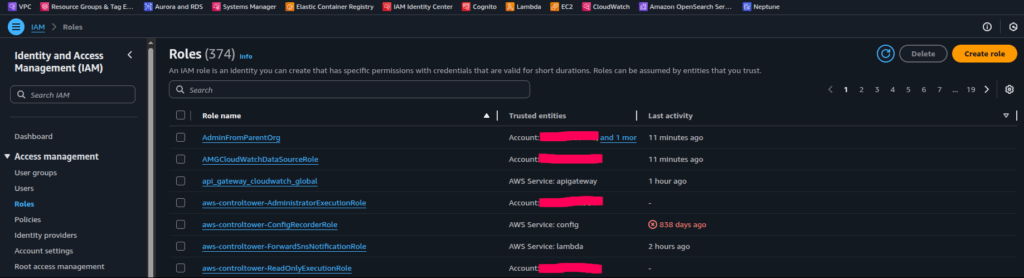
Access in IAM is governed through written in JSON policies, that explicitly define which actions are allowed or denied on which resources. Policies can be attached to users, groups or roles and can also be applied directly to AWS resources such as S3 buckets, KMS keys or SQS queues (these are known as resource-based policies). This flexible structure allows permissions to be managed from both the identity and resource perspectives, creating a layered and adaptable security model.
IAM policies can include boundaries and conditions to refine access control even further. Permissions boundaries act as limits on the maximum permissions a role or user can receive, regardless of what individual policies grant. This feature is particularly valuable in large organizations where teams may manage their own roles but must still stay within centrally defined security limits. Policy conditions add context-based control, allowing permissions to depend on factors such as source VPC endpoint id, time of day or whether MFA is enabled.
{
  "Version": "2012-10-17",
  "Statement": [
    {
      "Sid": "AllowReadOnlyAccessFromSpecificVPCEndpoint",
      "Effect": "Allow",
      "Action": [
        "s3:GetObject",
        "s3:ListBucket"
      ],
      "Resource": [
        "arn:aws:s3:::my-company-bucket",
        "arn:aws:s3:::my-company-bucket/*"
      ],
      "Condition": {
        "StringEquals": {
          "aws:sourceVpce": "vpce-0a1b2c3d4e5f67890"
        },
        "Bool": {
          "aws:SecureTransport": "true"
        }
      }
    }
  ]
}
In multi-account environments, IAM works together with Service Control Policies (SCPs) – see “Security in AWS – Part 6“
A core principle in IAM is the least privilege model, which means granting only the permissions necessary for a specific task. For instance, a developer working with S3 should have access to the required buckets but not to production databases or IAM configuration. Enforcing least privilege minimizes the potential impact of accidental misconfigurations or compromised credentials and ensures that access rights remain intentional and auditable.
Permission Evaluation Flow
Every request to access an AWS resource goes through a structured permission evaluation process. This process determines whether the request should be allowed or denied, based on the combination of IAM policies, resource policies and organization-level controls that apply to the user or service making the request.
At a high level, AWS follows a default deny model. This means that, by default, no one can access any resource unless an explicit permission is granted. Once a request is made, AWS evaluates all applicable policies in a specific order to reach a final decision.
- Explicit Deny
If any applicable policy (identity, permission boundary, resource, SCP) explicitly denies the requested action, the request is immediately blocked. An explicit deny always overrides any allow statement that might exist elsewhere. - Explicit Allow
If no explicit deny is found, AWS looks for policies that explicitly allow the request. An allow can come from an identity-based policy (attached to a user, group or role), a resource-based policy (attached directly to the resource such as an S3 bucket or KMS key), a permission boundary or a session policy created by STS. - Implicit Deny
If no explicit allow is found, the request is denied by default. This implicit deny acts as the baseline of security in AWS, ensuring that no access is granted accidentally.
So once a request to access AWS resources issued, AWS applies a logical evaluation:
- Start with deny by default
- Look for any explicit deny → if found, the request fails
- If no deny exists, check for explicit allow → if found, the request succeeds
- If neither condition is met, the result remains an implicit deny
Resource Policies
As already mentioned, while IAM identity policies control who can access resources, resource policies define what those resources allow in return. AWS services such as S3, KMS and SQS support their own resource-based policies. These policies determine which principals, i.e. accounts, users or roles, can perform actions directly on the resource.
For example, an S3 bucket policy might allow read access from a specific AWS account or from a CloudFront distribution while blocking all public access. Similarly, KMS key policies define which principals can use encryption keys. Combining IAM user policies with resource policies allows for both centralized and decentralized control depending on organizational needs.
{
  "Version": "2012-10-17",
  "Statement": [
    {
      "Sid": "AllowAccessFromTrustedAccount",
      "Effect": "Allow",
      "Principal": {
        "AWS": "arn:aws:iam::123456789012:root"
      },
      "Action": [
        "s3:GetObject"
      ],
      "Resource": "arn:aws:s3:::my-secure-bucket/*"
    }
  ]
}
AWS Security Token Service (STS)
The AWS Security Token Service (STS) plays a pivotal role in the IAM authentication and authorization in AWS. It provides temporary security credentials that enable users, applications and AWS services to access resources securely without relying on long-term access keys. Instead of issuing static credentials that can be forgotten, reused or exposed, STS generates short-lived tokens that automatically expire after a defined duration. This approach significantly reduces the window of opportunity for misuse and ensures that access ends as soon as it is no longer needed.
When a user or service needs to perform an action, it can request temporary credentials from STS by assuming a role. These credentials include an access key ID, a secret access key and a session token, all of which remain valid only for a short time, typically from a few minutes up to an hour. Once the session expires, the credentials stop working, removing the need for manual revocation or cleanup. It is worth noting, that access key ID and secret access key itself don’t provide any permission. Instead they are linked to an IAM policy attached to the identity access key ID and secret access key belongs to. This approach works both for IAM users and IAM roles (when assumed).
STS is core system to how AWS implements cross-account access and federated authentication. In a multi-account environment, it allows a user or service in one account to assume a role in another account without creating duplicate identities. For example, an analytics application running in one AWS account can use STS to assume a read-only role in a shared data account, gaining temporary access to S3 objects without storing any long-term keys.
SAML Federation
Federation works in a similar way but connects AWS to external identity providers such as, for instance, MS ADFS. When a user signs in through its single sign-on system, the MS ADFS authenticates a user, returns token, which includes the name of the specific AWS IAM role (this should be configured beforehand) and once a user provides AWS STS with IAM Role, it issues temporary AWS credentials mapped to a this specific IAM role. This allows employees to use their corporate credentials to access AWS resources without separate accounts or passwords.
AWS IAM Identity Center
AWS IAM Identity Center (the successor to AWS Single Sign-On) provides a centralized way to manage access for users across multiple AWS accounts and business applications. It acts as a unified identity and access layer that simplifies how employees and partners sign in, while keeping permissions consistent and secure across the organization.
Through a single web portal, users can access all assigned AWS accounts, roles and applications using one set of corporate credentials. This eliminates the need to remember multiple passwords and reduces the risk of weak or reused credentials. From an administrative perspective, it also simplifies onboarding and offboarding because user access can be provisioned or revoked directly through a central directory instead of being managed individually in each account.
IAM Identity Center integrates with external identity providers through SAML 2.0 federation, enabling single sign-on using existing enterprise directories such as Microsoft Active Directory, Okta or Google Workspace. When a user logs in, authentication occurs entirely in the organization’s identity system, and then IAM Identity Center maps that user to AWS roles and permissions according to preconfigured assignments. This ensures that access to AWS resources aligns with company-wide security and compliance requirements.
In addition to authentication, IAM Identity Center provides fine-grained authorization management through permission sets (we can think about them as of simple identity policies), which define what actions users can perform once they assume a role in a given AWS account. Permission sets are based on IAM policies and can be standardized across multiple accounts, ensuring consistent control while reducing configuration drift.

IAM Identity Center also integrates with AWS Organizations, allowing administrators to scale access control across all member accounts automatically. Changes made in Identity Center, such as role assignments or permission updates, are propagated consistently to every connected account.
Amazon Cognito
Amazon Cognito provides a managed solution for identity management and user authentication in web and mobile applications. It enables developers to easily add sign-up, sign-in and access control capabilities without having to build and maintain their own authentication infrastructure.
Cognito supports two main components: User Pools and Identity Pools.
User Pools are fully managed user directories that handle user registration, authentication and account recovery. They can store user credentials securely, enforce password policies and integrate with multi-factor authentication (MFA) for additional protection. Cognito User Pools support both native users (who sign up directly through the application) and federated users who log in using third-party identity providers like Google, Apple, Facebook or enterprise directories through OpenID Connect (OIDC) and SAML 2.0. This flexibility makes it suitable for both consumer-facing apps and internal corporate tools.
Identity Pools (also known as Federated Identities) allow users, which have been already authenticated through User Pools (or external identity providers) to obtain temporary AWS credentials. This enables them to access AWS resources such as S3, DynamoDB or API Gateway directly with fine-grained permissions.
The service manages complex authentication tasks behind the scenes, including token generation, session handling and credential rotation. It automatically issues JSON Web Tokens (JWTs) that applications can use to verify user identity and control access to APIs or other protected resources. Features like built-in MFA, account recovery, adaptive authentication and email or SMS verification enhance both security and user experience.
Real-Use Case Scenario
This time, we will explore how access to AWS OpenSearch Dashboards can be managed using Amazon Cognito and IAM Identity Center. Even though nowadays an AWS OpenSearch has its own native integration with IAM Identity Center, I consider the example below quite useful, since it covers such services from the Identity and Access Management Domain as policies, Cognito User Pool, Cognito Identity Pool, IAM roles and STS.
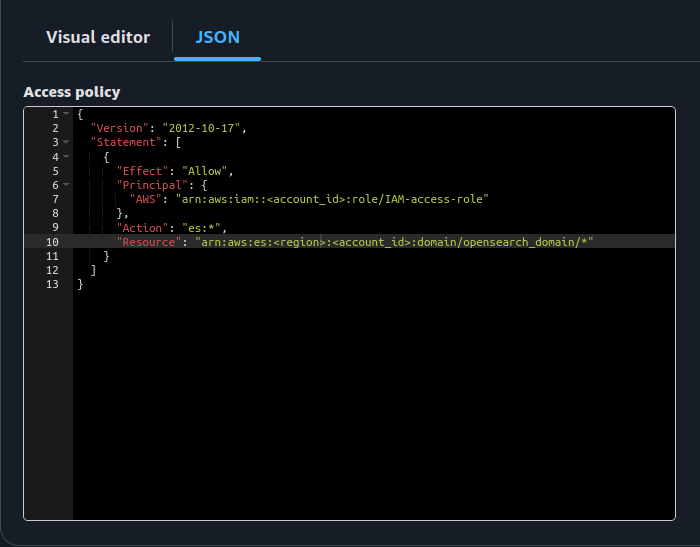
Let’s assume we have a multi-account AWS environment where user management is handled centrally through IAM Identity Center. One of these AWS accounts hosts an OpenSearch domain that receives application logs. AWS users need access to the OpenSearch Dashboards to analyze these logs. Authentication to OpenSearch should be performed through Amazon Cognito User Pools, while authorization (that is defining what actions users can perform) is managed by the OpenSearch domain access policy. This policy specifies which actions a given principal can perform on the domain’s subresources such as OpenSearch indexes or APIs – see Figure 3
We start with authentication part. For this, we create a Cognito User Pool and configure it in the OpenSearch domain settings. The Cognito User Pool itself remains empty (it does not contain native users), because authentication will be delegated to IAM Identity Center.
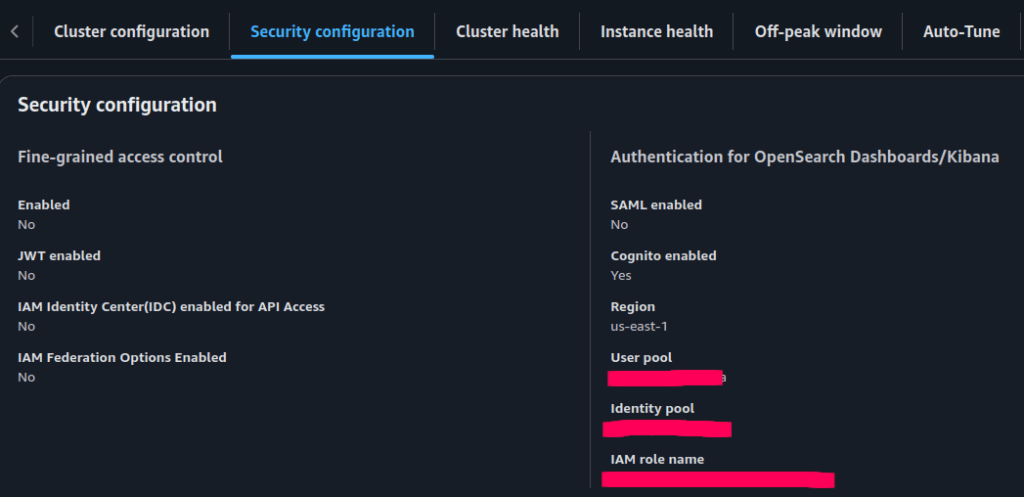
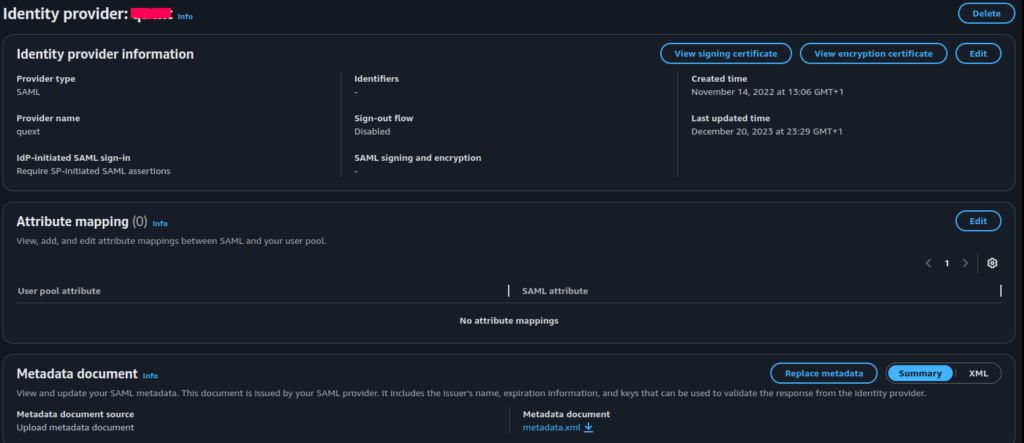
To achieve this, we establish a SAML connection between the Cognito User Pool and IAM Identity Center, making IAM Identity Center act as the identity provider for Cognito. As a result, users who log in through IAM Identity Center are automatically authenticated to the Cognito User Pool as well. See the relevant Cognito User Pool configuration at the Figure 5.
Next, let’s discuss access to the OpenSearch Dashboards.
As shown in Figure 6, access to the OpenSearch Dashboard requires assuming the IAM role named “IAM-access-role”. The AWS service that enables the exchange of authenticated identity for temporary IAM credentials is Amazon Cognito Identity Pools. The Cognito Identity Pool acts as a bridge between authenticated identities in the Cognito User Pool and the IAM roles. In this setup, when a user successfully logs in through the Cognito User Pool, the Cognito Identity Pool issues temporary AWS credentials based on the permissions of the IAM role “IAM-access-role”. These credentials allow access to the OpenSearch Dashboard as defined by the Opensearch domain access policy.
Thus, the overall flow of accessing the OpenSearch Dashboard consists of the steps:
- A user authenticates through AWS IAM Identity Center in the main AWS account.
- The user receives a SAML assertion and is redirected to Amazon Cognito User Pool, where it is authenticated.
- The Cognito Identity Pool issues temporary IAM credentials associated with the IAM role “IAM-access-role”.
- Using these credentials, the user accesses the OpenSearch Dashboard.
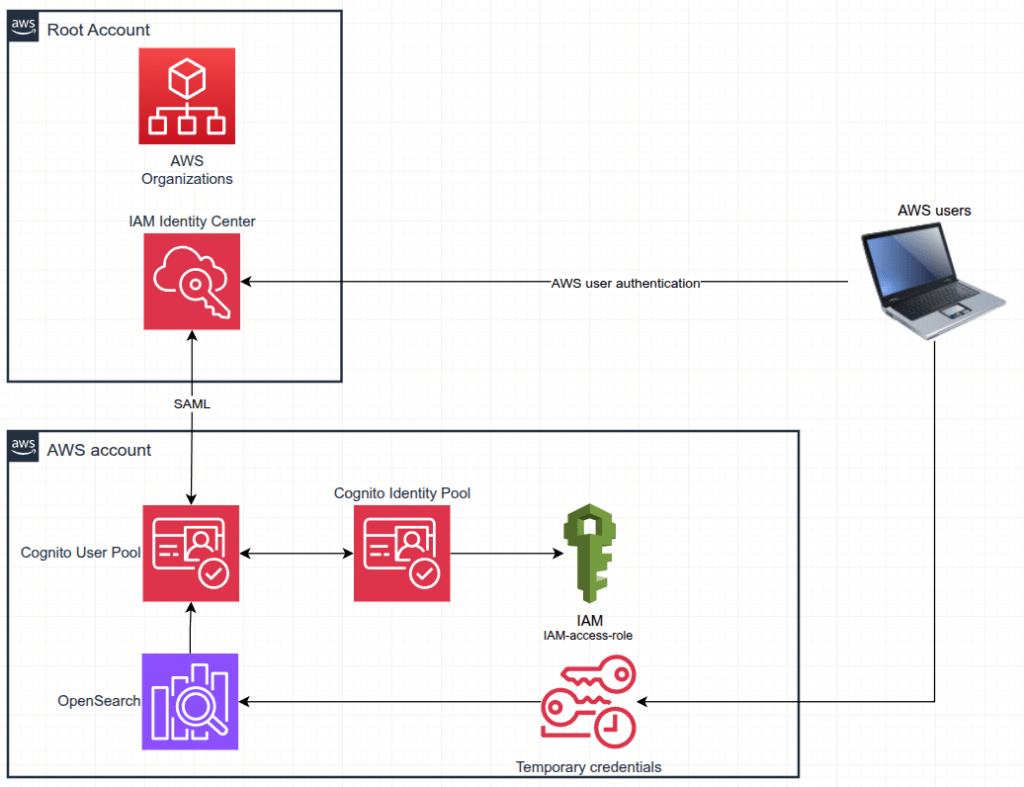
This architecture ensures secure and centralized authentication via IAM Identity Center, seamless federation through Cognito and fine-grained authorization managed by IAM and OpenSearch domain policies.
Identity and Access Management Recap
| Function | Primary Services | Objective |
|---|---|---|
| Identity creation and grouping | IAM users, groups, roles | Define and manage who can access AWS resources |
| Temporary credential management | AWS Security Token Service (STS) | Provide short-lived credentials for secure, time-limited access |
| Policy evaluation and enforcement | IAM policies, resource policies, SCP | Govern what actions are permitted or denied across services |
| Application and user authentication | Amazon Cognito | Authenticate end users for web and mobile applications |
| Centralized workforce access | IAM Identity Center, SAML federation | Provide unified access using corporate credentials |
See the next part Security in AWS – Part 5
By Pavel Luksha, Senior DevOps Engineer, Klika Tech, Inc.