


TABLE OF CONTENTS
Domain 6: Management and Security Governance
Security governance in AWS is about maintaining control and consistency as an organization scales its cloud presence. When a company operates a single account, enforcing security standards is relatively straightforward. But as more teams, departments and projects begin managing their own AWS accounts, keeping security practices quickly becomes a challenge. Without clear governance, configuration drift, inconsistent policies and compliance gaps can easily appear.
AWS provides a set of management and governance services that help organizations stay organized, enforce standards and ensure compliance across multiple accounts and regions. These services make it possible to maintain a structured cloud environment where autonomy and innovation coexist with centralized oversight.
This domain focuses on how to design a multi-account strategy, apply global guardrails, monitor configurations and automatically enforce security requirements. Core services supporting this approach include AWS Organizations, AWS Control Tower, Service Control Policies (SCPs), AWS Resource Access Manager (RAM) and AWS Service Catalog.
In addition, previously discussed services such as AWS Config, AWS Trusted Advisor, AWS CloudTrail, ACM, IAM Identity Center, IAM Access Analyzer and other, play an important role here as well. Their multi-account capabilities allow organizations to aggregate compliance data, audit activity logs and maintain a single view of operational health and risk posture.
Together, these tools form a governance framework where every account is visible, every configuration is tracked and every policy is enforced automatically, ensuring that growth does not reduce control or weaken security.
AWS Organizations
AWS Organizations helps companies manage multiple AWS accounts as one coordinated environment. It provides a central place to create, organize and control accounts while maintaining consistent security and billing practices. This is especially useful as teams grow and different departments start using AWS independently. Instead of treating each account as an isolated island, Organizations connects them under a single management framework.
Accounts in an organization can be grouped into Organizational Units (OUs). Each OU represents a logical grouping of accounts that share similar purposes or security needs. For example, production accounts can be placed in one OU, development and testing accounts in another and shared services like logging or networking in a separate one. By applying policies at the OU level, administrators can enforce consistent rules across many accounts without having to configure each one individually.
AWS Organizations integrates tightly with Service Control Policies (SCPs), which act as guardrails that define the maximum level of permissions accounts can have. For instance, an SCP can block all accounts in a development OU from using certain regions or from disabling CloudTrail. This ensures that even if a local root account in one account creates overly permissive IAM policies, those permissions cannot exceed the limits defined by the SCP.
Another advantage of AWS Organizations is its integration with services like CloudTrail, AWS Config and Security Hub. These integrations allow centralized logging, configuration tracking and security monitoring across every account. When a new account is added to the organization, these services can be automatically enabled, ensuring visibility and compliance from day one.
AWS Organizations also simplifies billing and cost management. All accounts under an organization can be linked under consolidated billing, which combines charges into a single invoice while still tracking individual account usage. This provides both financial clarity and potential savings through shared volume discounts.
AWS Control Tower
AWS Control Tower builds on top of AWS Organizations and automates the setup and governance of multi-account environments. It provides a way to establish a secure and compliant multi-account AWS foundation without needing to manually configure every detail. When new accounts are created through Control Tower, they automatically inherit the same security baselines, logging setup and network structure as the rest accounts in the organization.
At its core, Control Tower establishes what AWS calls a landing zone. A landing zone is a standardized multi-account architecture that follows AWS best practices. This landing zone includes baseline configurations such as centralized logging, audit accounts, identity management integration and default guardrails. These elements ensure that every account starts with consistent controls and monitoring from the moment it is provisioned.
A key feature of Control Tower is its guardrails. Guardrails are preconfigured policies and rules that enforce or monitor compliance across accounts. Preventive guardrails are implemented through Service Control Policies (SCPs), which block actions that could violate security policies such as disabling CloudTrail or changing encryption settings. Detective guardrails are powered by AWS Config rules, which continuously evaluate resource configurations and alert administrators when something drifts out of compliance.
Control Tower also automates the creation of dedicated accounts for centralized logging and security operations. By default, it sets up a log archive account for storing CloudTrail and Config logs from all accounts and an audit account that gives security teams visibility into compliance and operational activity. These accounts are protected and isolated from other workloads, ensuring that monitoring data remains tamper-proof and accessible to governance teams.
Service Control Policies (SCPs)
As already mentioned in the “Security in AWS – Part 6”, Service Control Policies (SCPs) act as the highest-level permission boundaries within an AWS Organization. They define what actions can or cannot be performed across all accounts, regardless of the permissions granted by individual IAM policies. SCPs are essentially the organization’s “master rulebook,” ensuring that no account or user, not even the root user, can exceed the limits defined by central governance.
SCPs do not grant permissions on their own, they only restrict what can be done. For example, if an IAM policy allows an action but the SCP explicitly denies it, the denial takes precedence. This layered model provides strong control while allowing teams within each account to operate independently within safe limits.
Organizations typically use SCPs to enforce essential guardrails. Common examples are preventing the deletion of CloudTrail logs, blocking the creation of unencrypted S3 buckets, limiting resource creation to approved AWS Regions or ensuring that only specific instance types can be launched. These restrictions protect the organization from configuration drift, data exposure or non-compliance with regulatory requirements.
SCPs are applied at the organizational unit (OU) level, which means policies can be tailored for different environments such as production, development or shared services. As the organization grows, administrators can attach or detach SCPs without changing anything inside the member accounts, maintaining centralized control with minimal disruption.
By using SCPs, enterprises can confidently delegate account management to individual teams while knowing that core governance rules will always be enforced. This balance of autonomy and control helps large cloud environments remain secure, compliant and consistent across all accounts.
AWS Resource Access Manager (RAM)
AWS Resource Access Manager (RAM) enables secure resource sharing between AWS accounts without needing to duplicate configurations or data. It allows one account to grant access to specific resources, such as VPC subnets, EC2 Capacity reservations, ELB Trust stores and other, to other accounts or entire organizational units within AWS Organizations.
Using RAM helps reduce complexity and cost by allowing teams to use shared infrastructure instead of creating separate copies in each account. For example, a central networking account can share a VPC subnet with multiple application accounts while maintaining consistent security and routing controls.
All shared resources remain owned and managed by the original account, which retains full visibility and control over permissions. Access can be granted or revoked at any time, and all sharing activity is logged through AWS CloudTrail.
In practice, AWS RAM makes multi-account architectures more efficient by promoting shared use of common resources while preserving clear boundaries of ownership and governance.
AWS Service Catalog
AWS Service Catalog allows organizations to centrally manage and distribute approved cloud resources and application templates. It acts as an internal catalog of preconfigured solutions, like virtual machine images, databases, networking setups or full application stacks, which teams can deploy consistently without needing to build everything from scratch.
Each product in the catalog is defined using AWS CloudFormation templates, ensuring that deployments always follow company standards for security, compliance and cost control. Administrators can apply fine-grained permissions to decide who can launch specific products, which regions they can use and what configurations are allowed.
For example, a security team might publish a standard three-tier application architecture with preapproved networking, encryption and logging settings. Development teams can then launch this environment on demand, confident that it already meets organizational requirements.
In short, AWS Service Catalog gives developers the freedom to deploy resources quickly while ensuring that everything they create adheres to the same best practices and guardrails established by the organization.
Real-Use Case Scenario
In this section, I will describe how AWS Organizations are used in the multi-account AWS environment of the Klika QUEXT project.
We operate with more than ten AWS accounts, so AWS Organizations is enabled to centrally manage them. These accounts are grouped into Organizational Units (OUs) based on functional criteria, for example, accounts related to infrastructure, application workloads or data services are grouped together according to what they host and how they operate.
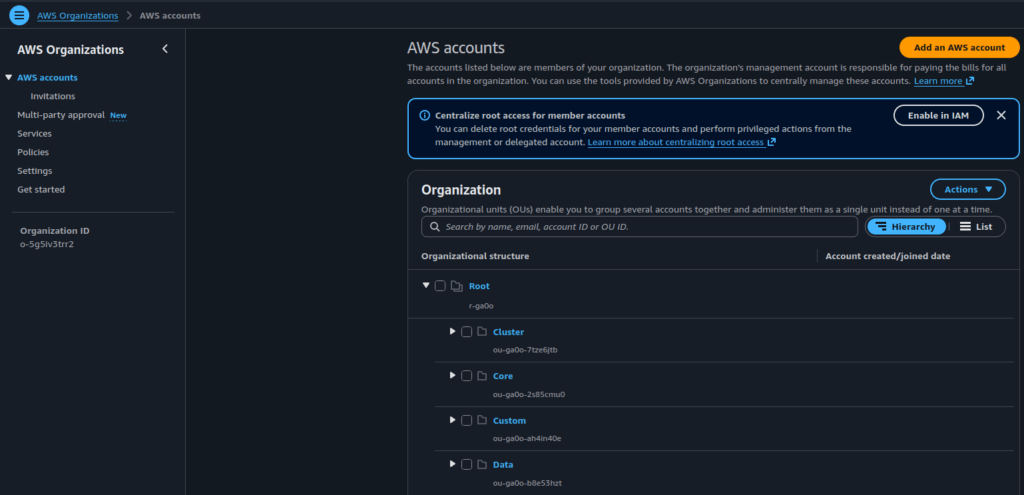
Each Organization Unit has Service Control Policies (SCPs) attached to it. SCPs define the maximum permission boundaries for all accounts within the OU. They ensure that no user or role, not even a root user, can perform actions that are restricted at the organization level.
As a practical example, the dev-datawarehouse account has he fhllowinge following SCPs applied:
- the standard “FullAWSAccess” SCP attached directly to the account
- the “aws-guardrails-nOOxWk” SCP inherited from the “Data” Organizational Unit
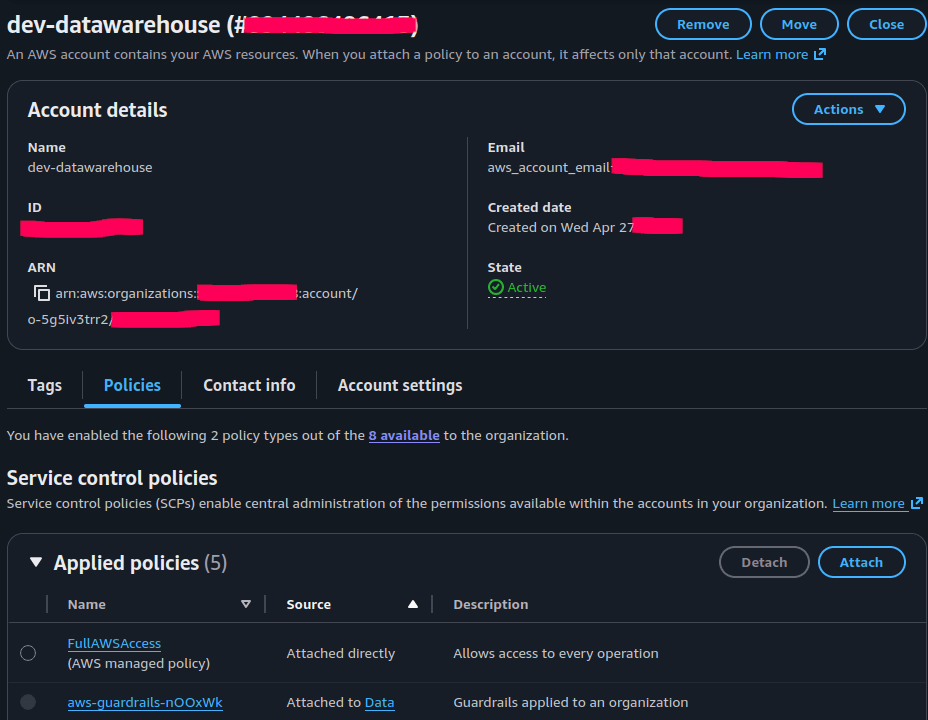
The policy named “aws-guardrails-nOOxWk”, among other restrictions, denies any modification of S3 bucket Lifecycle configurations, unless the action is performed by the AWSControlTowerExecution role. This prevents regular users from altering lifecycle rules, regardless of the permissions they might have inside their individual accounts.
...
    {
      "Condition": {
        "ArnNotLike": {
          "aws:PrincipalARN": [
            "arn:*:iam::*:role/AWSControlTowerExecution"
          ]
        }
      },
      "Action": "s3:PutLifecycleConfiguration",
      "Resource": "*",
      "Effect": "Deny",
      "Sid": "GRAUDITBUCKETRETENTIONPOLICY"
    }
If we log into the “dev-datawarehouse” account and attempt to change the Lifecycle configuration of any S3 bucket (even while using the root user), the action will fail. The denial does not come from IAM or local permissions, but from the SCP attached at the Organization level, which overrides all account-level policies:
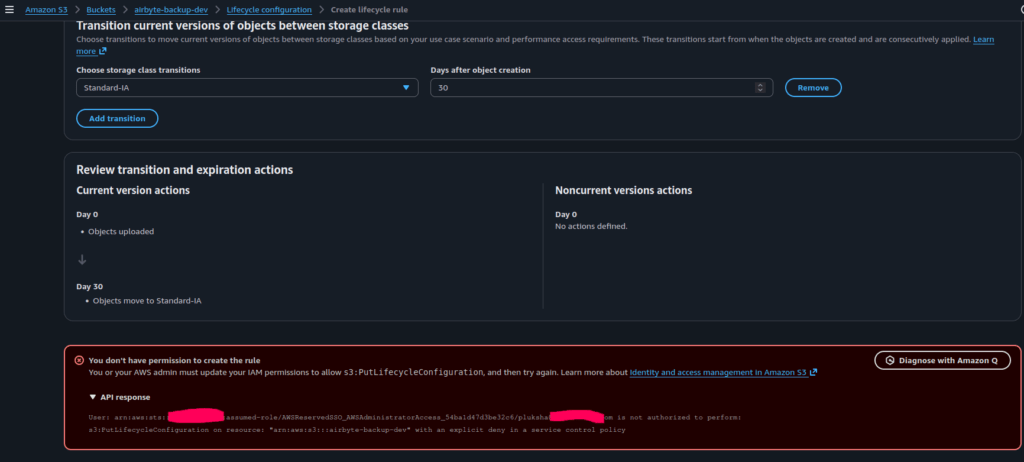
This demonstrates how AWS Organizations and SCPs enforce strong governance and prevent unauthorized or unsafe changes across the multi-account environment.
Management and Security Governance Recap
AWS Organizations provides the structure for managing accounts, Control Tower adds automation to create them with secure defaults, SCPs make sure that important restrictions cannot be bypassed. AWS RAM allows to share resources between accounts and
Together these services build a foundation of trust and control. They help organizations operate efficiently, keep visibility across all environments and maintain compliance without manual oversight. Governance in AWS is not just about setting rules once, it is about continuously verifying that those rules stay in effect as the cloud evolves.
| Function | Primary Services | Objective |
|---|---|---|
| Multi-account organization | AWS Organizations | Group and manage multiple accounts under one structure |
| Automated account setup | AWS Control Tower | Create accounts with preconfigured security and logging guardrails |
| Policy boundaries | Service Control Policies (SCPs) | Restrict actions across accounts to enforce organizational standards |
| Sharing AWS resources | AWS RAM | Sharing the AWS resources |
| Pre-configured templates of AWS resources | AWS Service Catalog | Provisioning pre-configured templates |
Where to Go From Here
This series of articles is designed to provide a high-level overview of AWS security services from the perspective of the AWS Certified Security – Specialty. As with everything in the technology world, AWS, including its security components, continues to evolve. The exam itself is now transitioning to SCS-C03, which introduces several new security topics and services, such as GenAI Security (Bedrock, SageMaker AI), Amazon CodeGuru Security and others.
To stay on track in a constantly changing AWS Security environment, I recommend two things: building a strong foundation in AWS Security by using the AWS Well-Architected Framework – Security Pillar and consistently keep learning the specifics.
There are many ways to study, from reading AWS documentation and practicing in hands-on labs to taking structured courses. I personally learn from courses like those offered by Stefaan Marek and Andrew Cantrill. Both are great, but I tend to prefer Andrew Cantrill’s courses, because while Stefaan Marek provides straightforward, exam-focused lectures and practical tasks, Andrew Cantrill offers an fundamental in-depth understanding of what lies behind the scene, which not only prepares individuals for exams but also gives them a real-world knowledge.
If you’re still unsure whether certification is right for you, take a look at my article Is AWS Certification Worth the Investment?
Conclusion
In this series of articles about Security in AWS, we explored the six Security Domains that form the foundation of the AWS Certified Security – Specialty exam (SCS-C02). We examined what each domain covers and which AWS Security Services are designed to address its specific objectives.
We also emphasized that security in AWS is a comprehensive, layered approach, where multiple services work together to protect every part of a cloud environment. Each domain in the AWS Certified Security – Specialty framework focuses on a different layer of protection, from early threat detection to governance and compliance at scale.
Let’s briefly recap what we’ve learned.
We start with the detection and incident response, where services like GuardDuty, Security Hub, Detective, AWS Config and Macie monitor activity and identify suspicious behavior. They help catch problems quickly and trigger automated responses before they grow into major incidents.
The next layer, security logging and monitoring, provides visibility into what is happening across the environment. CloudWatch, EventBridge, VPC Flow Logs, SNS and CloudTrail collect and connect signals from every corner of the infrastructure, turning data into clear and actionable information.
With infrastructure security, AWS gives the tools to build strong foundations. VPCs, VPC endpoints, Security Groups, ACLs, WAF and AWS Shield DDoS protection make sure that systems remain isolated, data stays private and connections are secure. The cloud itself becomes a controlled environment rather than an open network.
Identity and access management defines who can do what and under which conditions. IAM, STS, Cognito and AWS Identity Center ensure that access is granted precisely and temporarily, reducing the risk of misuse. Identity and resource policies make every permission deliberate and auditable.
Data protection keeps information secure both at rest and in transit. KMS, CloudHSM, Secrets Manager and data encryption for RDS, EBS, S3, etc make encryption a built-in feature, not an afterthought. Data in S3 or databases stays protected through layered encryption, managed keys and strong access controls.
Finally, management and security governance ensures that all these layers remain consistent across many accounts and teams. Organizations, Control Tower, SCPs, AWS Service Catalog and AWS RAM create a framework where compliance and security are continuously enforced, not just checked occasionally.
When these domains work together, security becomes part of the system rather than a separate task. Monitoring feeds into response, encryption ties into identity and governance connects every account under one set of standards. This layered approach creates a resilient environment where both technical teams and business leaders can operate with confidence.
By Pavel Luksha, Senior DevOps Engineer, Klika Tech, Inc.